Using the Bitstream Security Key Generator
About this task
The key generator tool simplifies the process of creating encryption keys and generating RSA certificates. You access this tool in the main menu at . You can use the key generator without opening a project.
Note: You can use the Bitstream Security Key Generator
iteratively. That is, you can first use encryption and later add in RSA
authentication, and even later disable JTAG commands. Refer to Workflow for Using Security Features for more information.
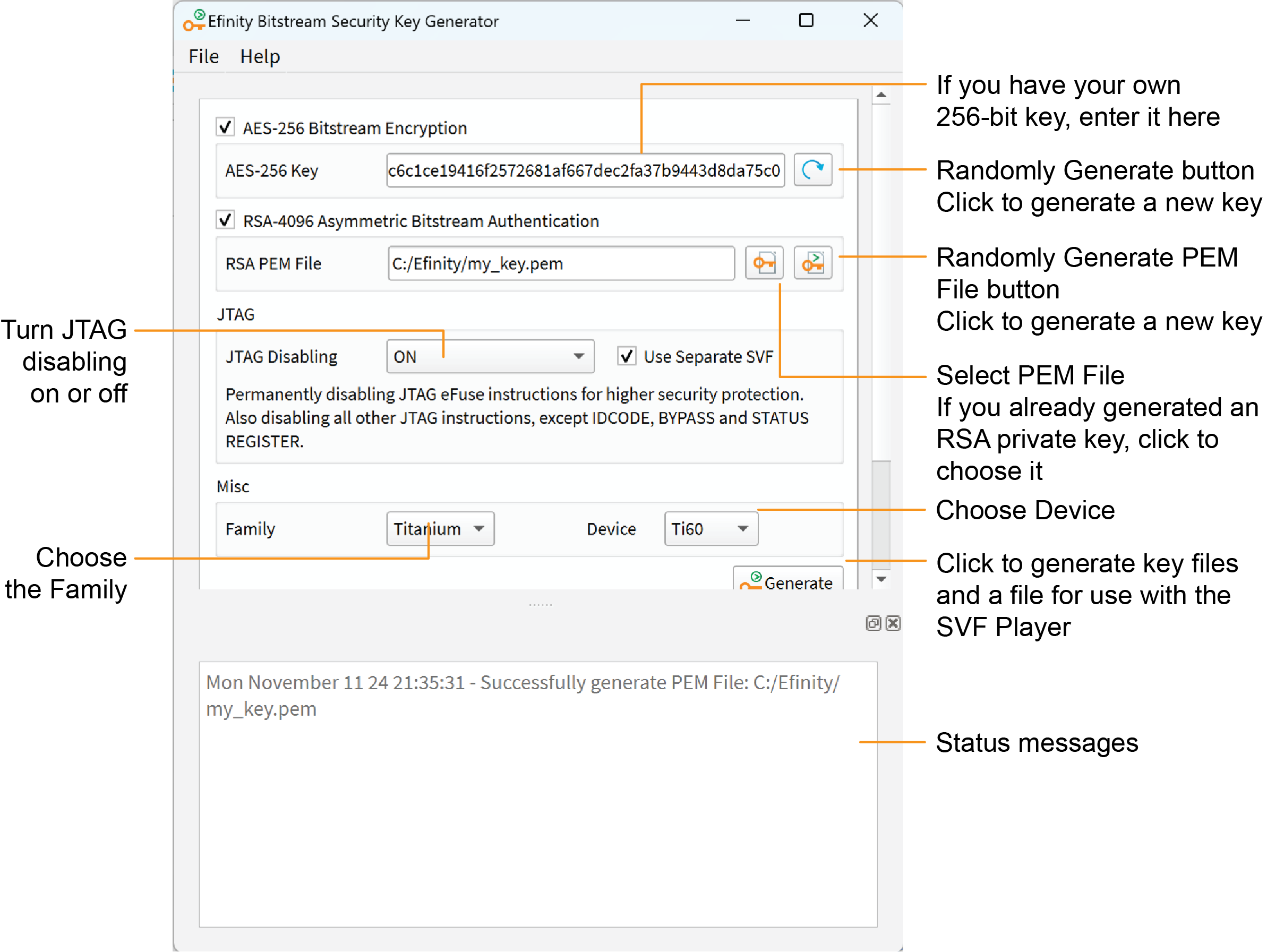
Procedure
Results
The tool creates the following files:
- <filename>.bin—This file contains key information. You specify it in the Project Editor when you turn on bitstream encryption and/or authentication.
- <filename>.pem—This file contains your RSA private key. You use this file to sign the bitstream by specifying it in the Project Editor.
- <filename>.svf—This file contains JTAG commands and key information. You use it with the SVF Player to blow the fuses.
Note: recommends that you save the 256-bit encryption key in a
safe place so you have it in case you want to generate another
.svf later (see Workflow for Using Security Features). You
need to copy it from the AES-256 Key box and save it into a
text file.