Attaching the FMC DDR3 and GPIO Daughter Card Daughter Card
The FMC DDR3 and GPIO Daughter Card attaches to the Titanium Ti180 J484 Development Board. Efinix® recommends that you also perform voltage tuning before using the FMC DDR3 and GPIO Daughter Card.
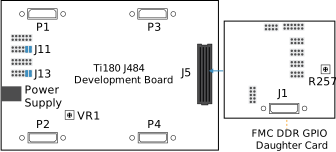
To connect a daughter card and tune the voltage supply:
- Without attaching the FMC DDR3 and GPIO Daughter Card, turn on the Titanium Ti180 J484 Development Board.
- Probe the PT4 test point and use the potentiometer VR1 to tune the voltage to 1.35 V.
- Turn off the Titanium Ti180 J484 Development Board.
- Ensure the power supply and board power switch are turned off, then connect FMC DDR3 and GPIO Daughter Card to the Titanium Ti180 J484 Development Board.
- Set the VCCIO voltage of the DDR3 signal I/O bank to FMC_VADJ (1.35 V) by
connecting the following jumpers on the Ti180 J484 Development Board:
- Header J11—Connect pins 9 - 10 and 11 - 12
- Header J13—Connect pins 9 - 10 and 11 - 12
- Turn on the Titanium Ti180 J484 Development Board.
- Probe pin 1 or 2 on the J199 header and use potentiometer R257 to tune the voltage to 1.35 V.