DDR3 Soft Controller Testbench
You can choose to generate the testbench when generating the core in the IP Manager Configuration window. To generate testbench, the Testbench Deliverables Option signals must be enabled.
provides a simulation script for you to run the testbench
quickly using the Modelsim software. To run the Modelsim testbench script, run
vsim -do modelsim.do in a terminal application. You must have
Modelsim installed on your computer to use this script.
The IP Manager also generates source codes for you to simulate with different simulators.
| Directory/File | Note |
|---|---|
| ../Testbench/native_modelsim.do | Modelsim testbench script for native mode. |
| ../Testbench/axi_modelsim.do | Modelsim testbench script for AXI4 mode. |
| ../Testbench/modelsim | Contains the generated encrypted source code to simulate with the Modelsim simulator. |
| ../Testbench/ncsim | Contains the generated encrypted source code to simulate with the NCSIM simulator. |
| ../Testbench/synopsys | Contains the generated encrypted source code to simulate with the VCS simulator. |
| ../Testbench/aldec | Contains the generated encrypted source code to simulate with the Aldec simulator. |
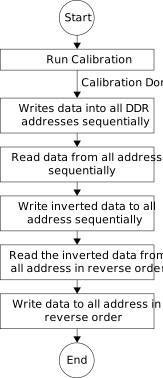
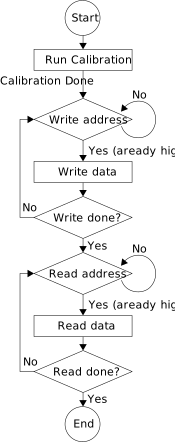
The IP Manager generates the native or AXI4 mode testbench depending on the DDR Interface parameter you select. The testbench performs a pattern-matching simulation as shown in the following diagrams.
After running the simulation successfully, the test prints the following message:
efx_ddr3_soft_controller_tb.ddr3md.data_task: at time 24233850.0 ps INFO: READ @ DQS= bank = 0 row = 0000 col = 0000017e data = 0304
efx_ddr3_soft_controller_tb.ddr3md.data_task: at time 24235100.0 ps INFO: READ @ DQS= bank = 0 row = 0000 col = 0000017f data = 0102
DDR3 Controller PASS