UART Example Design
You can choose to generate the example design when generating the core in the IP Manager Configuration window. Compile the example design project and download the .hex or .bit file to your board. To generate example design, the Example Design Deliverables Option signal must be enabled.
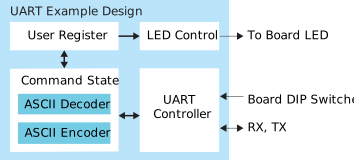
The example design targets the Trion® T20 BGA256 Development Board and Titanium Ti60 F225 Development Board. The design implements a UART controller in the FPGA, which allows you to control the LEDs on the board by sending commands from a terminal program on your computer to the board. Additionally, the design allows you to change the baud rate during run-time by using the DIP switches on the development boards.
- Command State—Decodes and encodes the read/write command, address, and data to and from the UART controller.
- User Register—Stores the register mapping.
- LED Control—Latches the last 4 bits of written data and displays the lower byte on the LEDs in binary.
| FPGA | LUTs | Registers | Memory Blocks | Multipliers | fMAX (MHz)1 | Efinity® Version2 |
|---|---|---|---|---|---|---|
| T20 BGA256 C4 | 492 | 565 | 0 | 0 | 92 | 2022.1 |
| FPGA | Logic and Adders | Flip-flops | Memory Blocks | DSP48 Blocks | fMAX (MHz)1 | Efinity® Version2 |
|---|---|---|---|---|---|---|
| Ti60 F225 C4 | 503 | 566 | 0 | 0 | 282 | 2022.1 |