MIPI DSI RX Controller Example Design
You can choose to generate the example design when generating the core in the IP Manager Configuration window. Compile the example design project and download the .hex or .bit file to your board.
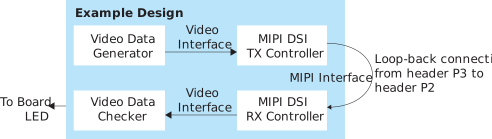
The example design targets the Titanium Ti60 F225 Development Board. The design instantiates both MIPI DSI TX and RX Controller cores. This design requires a QTE header-compatible cable.
The design generates video frame data and sends the video data to the MIPI DSI TX Controller. The data is then sent through a hardware loopback on the board using a 4-lane MIPI interface to the MIPI DSI RX Controller. There is video data checker compares the data received with the one created by the video data generator, and outputs the results using the board LEDs.
- LED D17 B—Blinks continuously indicating there are traffic being sent over to MIPI IP.
- LED D16 R—Turns on to indicate that the hsync signal matches TX and RX.
- LED D16 G—Turns on to indicate that the vsync signal matches TX and RX.
- LED D16 B—Turns on to indicate that the pixel data signal matches TX and RX.
- LED D17 R—Turns on to indicate that the pixel data valid signal matches TX and RX.
The RX clock to RX data skew varies in different board, hence there is a possibility
where the RX clock might not be able to capture the RX data correctly. In this case,
both the LEDs do not turn on. You have to try increase the Static Mode Delay
Setting of mipi_dphy_rx_data in the Interface Designer.
| FPGA | Logic Elements (Logic, Adders, Flipflops,etc.) | Memory Blocks | DSP Blocks | fMAX (MHz)1 | Efinity® Version2 | |||
|---|---|---|---|---|---|---|---|---|
| clk | axi_clk | clk_byte_HS | clk_pixel | |||||
| Ti60 F225 C4 | 10,308 / 60800 (16.95%) | 59/256 (23.05%) | 0/160 (0%) | 205 | 298 | 209 | 184 | 2024.2.294.4.12 |