Trion PLL Auto-Reset Example Design
You can choose to generate the example design when generating the core in the IP Manager Configuration window. Compile the example design project and download the .hex or .bit file to your board. To generate example design, the Example Design Deliverables Option signal must be enabled.
Important: tested the example design generated
with the default parameter options only.
The example design targets the Trion® T20 BGA256 Development Board.
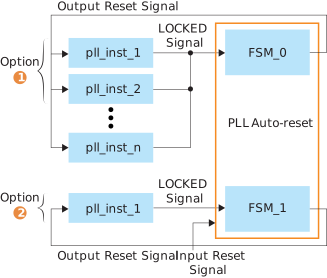
As the figure shows, there are 2 ways to use the PLL Auto-Reset Core in your
design:
- Option 1: Select one FSM for several instantiated PLLs to reduce resource
utilization. You can share one FSM with all PLLs in the device if
desired.Note: You can ANDs the PLL's
LOCKEDsignals. If one of the PLLs cannot lock within tLOCK, the IP resets all PLLs. It continues to trigger reset pulse until all the PLLs are locked within tLOCK after the reset pulse. If all PLLs cannot lock when using one FSM, you can create more FSMs and assign fewer PLLs to them. - Option 2: You can select one FSM for each instantiated PLL.
LOCKED signal and resets the PLL. It feeds a reset pulse signal
back to the PLL if the PLL's LOCKED signal pin is not driven
high.To implement the example design:
- Create a new project.
- Generate the IP with
FSM Countset to2. - Open the project file (.xml) in <path-to-project>\ip\<ip-module-name>\T20F256_devkit\pll_autoreset.xml.
- Compile the design.
- Download the design to your Trion® T20 BGA256 Development Board.
After configuration, the LED D3, D4, and D5 light up when the PLL
LOCKED signal is driven high. Press the SW4 switch to reset the
PLL. The PLLs LOCKED signal goes low.
| FPGA | FSM Count | Clock | Logic Elements (Logic, Adders, Flipflops, etc.) | Memory Block | Multiplier Block | Efinity® Version1 |
|---|---|---|---|---|---|---|
| T20 F256 C4 | 2 | 5/16 (6.3%) | 197/19,728 (0.5%) | 0/204 (0%) | 0/36 (0%) | 2024.1 |
1 Using Verilog HDL.