Programming the Board
Before programming your board with the example design, you need to:
- Open the generated example design project file and compile the project to generate the flash loader file jtag2spi_flash.bit.
- Prepare a configuration bitstream, which is also referred to as user design bitstream file, .hex to be programmed to the board.
The JTAG to SPI Flash Bridge core on the FPGA writes data to the flash serially (x1). You can also reconfigure the FPGA using x1, x2, x4, or x8. You can configure the settings through . Refer to AN 006: Configuring Trion FPGAs, AN 033: Configuring Titanium FPGAs or AN 061: Configuring Topaz FPGAs for more information.
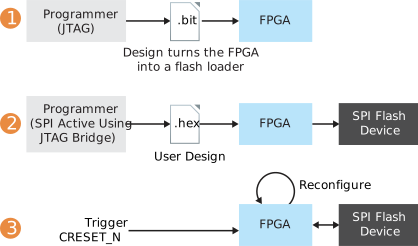
The flash programming flow consists of these steps:
- To configure the FPGA into a flash loader:
- Go to Efinity Programmer, in the Programming Mode, select JTAG.
- In the Image box, click the Select Image File button and select jtag2spi_flash.bit.
- Click the Start Program button.
- To program the SPI flash device through the flash loader:
- Go to Efinity Programmer, in the Programming Mode, select SPI Active using JTAG Bridge .
- In the Image box, click the Select Image File button and select your design file, .hex.
- Turn on Auto configure JTAG Bridge Image option.
- Ensure that the Starting Flash Address is set to 0x000000.
- Click the Start Program button.
- Toggle the FPGA's
CRESET_Nsignal to trigger reconfiguration using the new flash image.
Note: You can combine step 1 and step 2 using the SPI
Active using JTAG Bridge by enabling the Auto configure JTAG
Bridge Image option.