Tz170 HSIO Configured as LVDS
- Programmable VOD, depending on the I/O standard used.
- Programmable pre-emphasis.
- Up to 1.3 Gbps.
- Programmable 100 Ω termination to save power (you can enable or disable it at runtime).
- LVDS input enable to dynamically enable/disable the LVDS input.
- Support for full rate or half rate serialization.
- Up to 10-bit serialization to support protocols such as 8b10b encoding.
- Programmable delay chains.
- Optional 8-word FIFO for crossing from the parallel (slow) clock to the user’s core clock to help close timing (RX only).
- Dynamic phase alignment (DPA) that automatically eliminates skew for clock to data channels and data to data channels by adjusting a delay chain setting so that data is sampled at the center of the bit period. The DPA supports full-rate serialization mode only.
| Mode | Description | Example |
|---|---|---|
| Full rate clock | In full rate mode, the fast clock runs at the same frequency as the data and captures data on the positive clock edge. |
Data rate: 800 Mbps
Serialization/Deserialization factor: 8
Slow clock frequency: 100 Mhz (800 Mbps / 8)
Fast clock frequency: 800 Mhz
|
| Half rate clock | In half rate mode, the fast clock runs at half the speed of the data and captures data on both clock edges. |
Data rate: 800 Mbps
Serialization / Deserialization factor: 8
Slow clock frequency: 100 Mhz (800 Mbps / 8)
Fast clock frequency: 400 Mhz (800 / 2 )
|
You use a PLL to generate the serial (fast) and parallel (slow) clocks for the LVDS pins. The slow clock runs at the data rate divided by the serialization factor.
LVDS RX
You can configure an HSIO block as one LVDS RX signal.
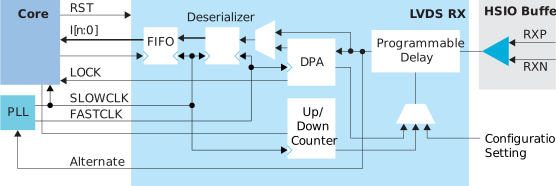
| Signal | Direction | Clock Domain | Description |
|---|---|---|---|
| I[9:0] | Output | SLOWCLK | Parallel input data to the core. The width is programmable. |
| ALT | Output | – | Alternate input, only available for an LVDS RX resource in bypass mode (deserialization width is 1; alternate connection type). Alternate connections are PLL_CLKIN, PLL_EXTFB, GCLK, and RCLK. |
| SLOWCLK | Input | – | Parallel (slow) clock. |
| FASTCLK | Input | – | Serial (fast) clock. |
| FIFO_EMPTY | Output | FIFOCLK | This signal is required when you turn on the Enable Clock Crossing FIFO option. Indicates that the FIFO is empty. |
| FIFOCLK | Input | – | This signal is required when you turn on the Enable Clock Crossing FIFO option. Core clock to read from the FIFO. |
| FIFO_RD | Input | FIFOCLK | This signal is required when you turn on the Enable Clock Crossing FIFO option. Enables FIFO to read. |
| RST | Input | FIFOCLK SLOWCLK |
(Optional) This signal is available when deserialization is enabled. Asynchronous. Resets the FIFO and deserializer. If the FIFO is enabled, it is relative to FIFOCLK; otherwise it is relative to SLOWCLK. |
| ENA | Input | – | Dynamically enable or disable the LVDS input buffer. Can save
power when disabled. 1: Enabled 0: Disabled |
| TERM | Input | – | The signal is available when dynamic termination is enabled.
Enables or disables termination in dynamic termination
mode. 1: Enabled 0: Disabled |
| LOCK | Output | – | (Optional) This signal is available when you set Delay Mode to dpa. Indicates that the DPA has achieved training lock and data can be passed. |
| DLY_ENA | Input | SLOWCLK | This signal is required when you set Delay Mode to dynamic or dpa. Enable the dynamic delay control or the DPA circuit, depending on the LVDS RX delay settings. |
| DLY_INC | Input | SLOWCLK | This signal is required when you set Delay
Mode to dynamic. Dynamic
delay control. Cannot be used with DPA enabled. When DLY_ENA is
1: 1: Increments 0: Decrements |
| DLY_RST | Input | SLOWCLK | (Optional) This signal is available when you set Delay Mode to dpa or dynamic. Reset the delay counter or the DPA circuit, depending on the LVDS RX delay settings. |
| DBG[5:0] | Output | SLOWCLK | DPA debug pin. Outputs the final delay chain settings when DPA achieved lock. |
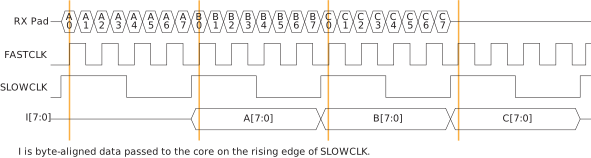
The following waveform shows the relationship between the fast clock, slow clock, RX data coming in from the pad, and byte-aligned data to the core.
LVDS TX
You can configure an HSIO block as one LVDS TX signal. LVDS TX can be used in the serial data output mode or reference clock output mode.
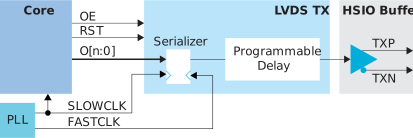
| Signal | Direction | Clock Domain | Description |
|---|---|---|---|
| O[9:0] | Input | SLOWCLK | Parallel output data from the core. The width is programmable. |
| SLOWCLK | Input | – | Parallel (slow) clock. |
| FASTCLK | Input | – | Serial (fast) clock. |
| RST | Input | SLOWCLK | (Optional) This signal is available when serialization is enabled. Resets the serializer. |
| OE | Input | – | (Optional) Output enable signal. |
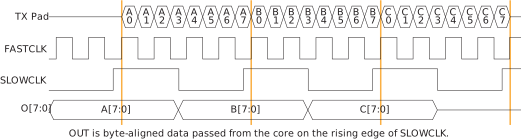
The following waveform shows the relationship between the fast clock, slow clock, TX data going to the pad, and byte-aligned data from the core.
LVDS Bidirectional
You can configure an HSIO block as one LVDS bidirectional signal. You must use the same serialization for the RX and TX.
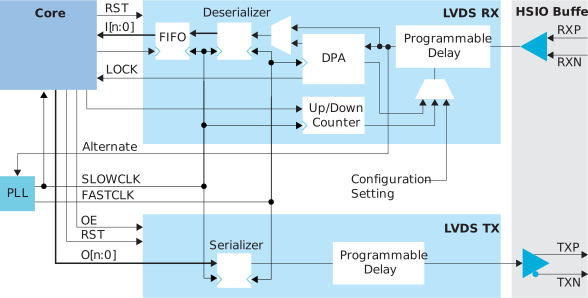
| Signal | Direction | Clock Domain | Description |
|---|---|---|---|
| I[9:0] | Output | SLOWCLK | Parallel input data to the core. The width is programmable. |
| INSLOWCLK | Input | – | Parallel (slow) clock for RX. |
| INFASTCLK | Input | – | Serial (fast) clock for RX. |
| FIFO_EMPTY | Output | FIFOCLK | This signal is required when you turn on the Enable Clock Crossing FIFO option. Indicates that the FIFO is empty. |
| FIFOCLK | Input | – | This signal is required when you turn on the Enable Clock Crossing FIFO option. Core clock to read from the FIFO. |
| FIFO_RD | Input | FIFOCLK | This signal is required when you turn on the Enable Clock Crossing FIFO option. Enables FIFO to read. |
| INRST | Input | FIFOCLK SLOWCLK |
This signal is available when deserialization is enabled. Asynchronous. Resets the FIFO and RX deserializer. If the FIFO is enabled, it is relative to FIFOCLK; otherwise it is relative to SLOWCLK. |
| ENA | Input | – | Dynamically enable or disable the LVDS input buffer. Can save
power when disabled. 1: Enabled 0: Disabled |
| TERM | Input | – | The signal is available when dynamic termination is enabled.
Enables or disables termination in dynamic termination
mode. 1: Enabled 0: Disabled |
| LOCK | Output | – | (Optional) This signal is available when you set Delay Mode to dpa. Indicates that the DPA has achieved training lock and data can be passed. |
| DLY_ENA | Input | SLOWCLK | This signal is required when you set Delay Mode to dynamic or dpa. Enable the dynamic delay control or the DPA circuit, depending on the bidirectional LVDS delay settings. |
| DLY_INC | Input | SLOWCLK | This signal is required when you set Delay
Mode to dynamic. Dynamic
delay control. Cannot be used with DPA enabled. When DLY_ENA is
1, 1: Increments 0: Decrements |
| DLY_RST | Input | SLOWCLK | (Optional) This signal is available when you set Delay Mode to dpa or dynamic. Reset the delay counter or the DPA circuit, depending on the bidirectional LVDS delay settings. |
| DBG[5:0] | Output | SLOWCLK | DPA debug pin. Outputs the final delay chain settings when DPA achieved lock. |
| O[9:0] | Input | SLOWCLK | Parallel output data from the core. The width is programmable. |
| OUTSLOWCLK | Input | – | Parallel (slow) clock for TX. |
| OUTFASTCLK | Input | – | Serial (fast) clock for TX. |
| OUTRST | Input | SLOWCLK | This signal is available when serialization is enabled. Resets the TX serializer. |
| OE | Input | – | Output enable signal. |
LVDS Pads
| Signal | Direction | Description |
|---|---|---|
| P | Output | Differential pad P. |
| N | Output | Differential pad N. |