eMMC Overview
In FPGA-based systems, eMMCs can perform these functions:
- System boot—Storing the operating system (OS) image
- Mass data storage—Recording acquired data, video streams, and system logs
- Running software—Such as operating systems and application software
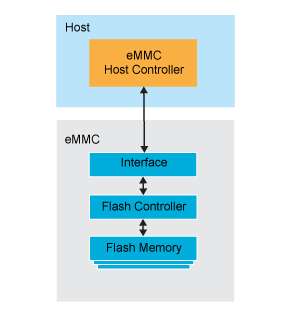
eMMCs are not just a standalone storage chip; they are an integrated solution composed of three key internal components:
- Interface—Provides a standardize host interface, allowing the main processor to access the storage easily as if it were a standard device.
- Flash Controller—Manages complex NAND flash operation such as read, write, erase, bad block management, wear leveling, and error correction.
- Flash Memory—Supplies data storage.
Efinix eMMC Module
Efinix provides users with an eMMC host controller module based on the eMMC 5.1 specification along with a corresponding Linux driver. To facilitate the use of eMMCs in system designs, you can use the GitHub embedded system solution platform for the Ti375 C529 development board as starting point.
Note that, the default platform design does not include a bootloader, so you will need it to boot Linux. Refer to bootloader for directions on how to stich the bootloader into the High-Performance Sapphire SoC. After that you need to compile the project and get the bitstream. The last essential step is to build your embedded Linux components, refer to eMMC on how to build your own eMMC enabled Linux image.
The eMMC host controller module supports the following speed specifications with data rates up to HS400 mode.
| Mode Name | Data Rate | I/O Voltage | Bus Width | Frequency | Theoretical Max Data Transfer (x8 Bus Width) |
|---|---|---|---|---|---|
| HS200 | Single | 1.8 V, 1.2 V | 4, 8 | 0 - 200 MHz | 200 MB/s |
| HS400 | Dual | 1.8 V, 1.2 V | 8 | 0 - 200 MHz | 400 MB/s |
Writing the Linux System
Before writing the Linux system files to eMMC, the following steps are required:
- Download the Linux system files from a server via the Ethernet interface.
- Use a custom script to partition and format the eMMC device.
To facilitate these operations, the RISC-V processor must first boot the system from an SD card.
The detailed procedure for writing the Linux system to eMMC is shown in the figure below:
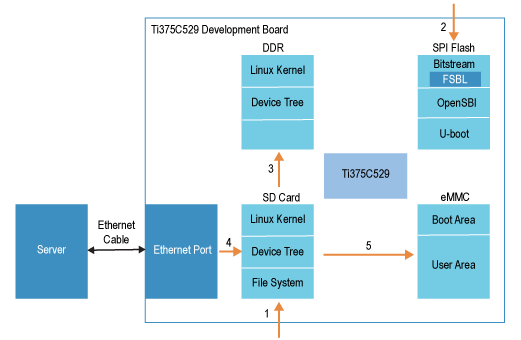
- Use Balena Etcher to flash sdcard.img (which includes the Linux kernel, device tree, and filesystem) onto the SD card.
- Use Efinity Programmer to erase the SPI flash, then program the emmc_linux.hex file (which contains the FPGA bitstream, OpenSBI, and U-Boot) into the flash. The FPGA bitstream includes the bootloader (FSBL).
Refer to Github on how to generate this emmc_linux.hex file. - After power-cycling the board, the bootloader runs and reads OpenSBI and U-Boot from SPI flash. Enter the run sd_bootcmd command to boot U-Boot, which loads the Linux kernel and device tree from the SD card into DDR memory. The RISC-V processor then boots the Linux kernel and device tree sequentially. After a successful boot, the filesystem is read from the SD card and mounted by the Linux system.
- Connect the development board to the server via the Ethernet interface, download uImage (Linux kernel image), linux.dtb (device tree blob), and rootfs.tar (root filesystem tarball) from the server, and write them to the SD card.
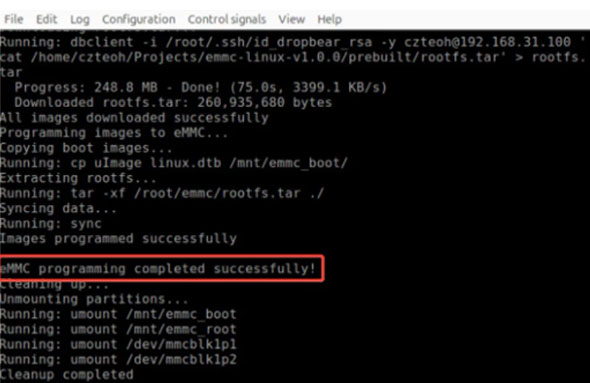
- Use the emmc_programmer script to read uImage, linux.dtb, and rootfs.tar from the SD card and program them into eMMC.
Loading the Linux System
The procedure for loading the Linux system from eMMC is shown in the figure below:
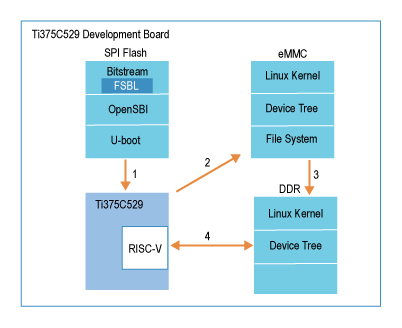
- After the development board is powered on, the bootloader runs and reads OpenSBI and U-Boot from the flash.
- U-Boot is then used to load the Linux kernel and device tree from the eMMC.
- The loaded Linux kernel and device tree are written into DDR memory.
- The RISC-V processor boots the Linux kernel and device tree from DDR sequentially. After a successful boot, the filesystem is read from the eMMC and mounted by the Linux system.
As shown in the following figure, after the Linux system has finished loading and entered the operating system, the lsblk command is executed, showing that the root filesystem is mounted on the second partition of the eMMC.
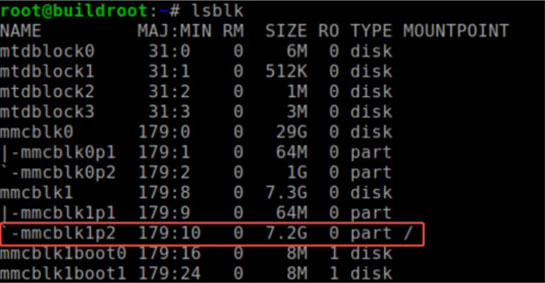
After successfully loading the Linux system on the FPGA, a fully functional embedded development environment is available, capable of running various applications and leveraging a rich toolchain for development, supporting a wide range of needs from basic development to high-performance computing.
Summary
Efinix provides an eMMC-based Linux system boot solution, enhancing the Efinix RISC-V ecosystem and making it easier for users to run Linux on RISC-V. At the same time, eMMC as the boot medium for Linux offers high reliability, ease of use, and strong performance. Its integrated design simplifies storage management, and through a standardized interface that works seamlessly with the RISC-V architecture, it supports the stable operation of the Linux system.